




If you are wondering why does my ac change by itself, you are not alone. Many users in the UAE experience sudden temperature or mode changes without touching the remote. In most cases, this is not a serious fault. This guide explains quick fixes, hidden settings, smart features, and when the issue requires professional attention.
Table of Contents
ToggleAuto Mode Is Active and Adjusting Your AC Automatically
One of the most common reasons your AC changes by itself is Auto Mode. When this mode is active, the system automatically adjusts temperature, fan speed, and cooling intensity based on room conditions.
For example:
- If the room cools down → AC reduces power
- If humidity increases → AC switches behavior
- If temperature rises → AC increases cooling again
This can feel like the AC is “changing on its own,” but it is actually following programmed logic.
Quick fix:
- Switch mode from “Auto” to “Cool” manually
- Set a fixed temperature (e.g. 22–24°C)
Preset Schedules Are Overriding Your Settings
Modern AC systems often include programmable schedules. These allow the unit to automatically turn on, off, or change temperature at specific times.
Common example:
- AC resets to 24°C every day at 8:00 AM
- Temperature increases automatically at night
If you do not remember setting this, it may have been configured earlier or by a previous tenant.
Quick fix:
- Check timer or schedule settings in remote or app
- Disable all programmed schedules
Sleep Timer Is Gradually Changing Temperature
Sleep Mode is designed to improve comfort and reduce energy usage while you sleep. It slowly increases temperature over time.
This can make it seem like your AC is changing settings by itself.
Quick fix:
- Turn off Sleep Mode
- Set manual temperature instead
Motion Sensors or Eco Mode Are Detecting Room Activity
Some AC systems include motion sensors or Eco Mode. These features adjust cooling based on whether the room is occupied.
For example:
- No movement detected → AC reduces cooling
- Movement detected → AC increases cooling again
This behavior can feel random if you are not aware of the sensor.
Quick fix:
- Disable Eco Mode
- Turn off motion sensor features if available
Thermostat Batteries Are Weak or Unstable
If your AC uses a remote or wall thermostat, weak batteries can cause signal instability. This may lead to random changes in settings.
Symptoms include:
- Temperature changes unexpectedly
- AC responds slowly or inconsistently
- Display flickers or resets
Quick fix:
- Replace batteries with new ones
- Avoid mixing old and new batteries
Conflicting Controllers Between Remote and Mobile App
Many modern systems allow control through both a remote and a mobile app. If both are active, they may conflict.
Example:
- App sets temperature to 22°C
- Remote changes it to 24°C
- System keeps switching between commands
Quick fix:
- Use only one control method at a time
- Reset app or unlink unused devices
Remote Control Issues or Stuck Buttons
A faulty remote can send repeated signals without you noticing.
Common causes:
- Stuck buttons
- Dirt inside remote
- Infrared signal interference
Quick fix:
- Remove batteries and test AC behavior
- Clean or replace the remote
Dubai Power Fluctuations and Voltage Drops
In some buildings, especially older ones, voltage fluctuations can affect AC behavior. Power instability may cause the system to reset or change settings.
Signs include:
- AC restarting suddenly
- Temperature resetting to default
Quick fix:
- Check building power stability
- Use voltage stabilizer if needed
Thermostat Placement Near Heat or Sunlight
If your thermostat is placed near sunlight, kitchen heat, or appliances, it may misread the room temperature.
This causes the AC to adjust unnecessarily.
Quick fix:
- Ensure thermostat is away from direct heat
- Avoid placing near windows or lamps
Dust and Humidity Affecting Sensors
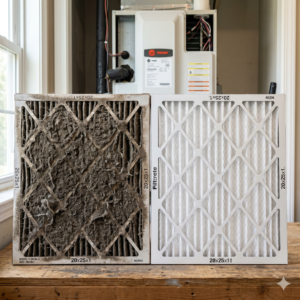
In the UAE, dust and humidity can interfere with AC sensors. This affects how the system reads temperature and airflow.
Result:
- AC adjusts incorrectly
- Cooling becomes inconsistent
In such cases, proper AC deep cleaning may help restore sensor accuracy.
Smart AC Features Like Geofencing and Adaptive Learning
Smart AC systems include advanced features that automatically adjust settings based on behavior.
- Geofencing → adjusts AC when you leave or return home
- Adaptive learning → learns your preferred temperature patterns
If enabled, these features can change settings without manual input.
Quick fix:
- Check app settings
- Disable smart automation features
How to Reset or Lock AC Settings
If your AC keeps changing settings, resetting it can help.
Steps:
- Turn off AC completely
- Disconnect power for 5–10 minutes
- Restart system
- Set manual mode (Cool)
Some systems also allow locking settings through remote or app.
Signs of Deeper Technical Problems
If none of the above fixes work, the issue may be technical.
Possible causes:
- Short cycling (AC turning on/off repeatedly)
- Faulty control board
- Wiring issues
- Sensor failure
These problems require proper diagnosis and should not be ignored.
When You Should Stop DIY and Get Professional Help
You should consider professional inspection if:
- AC keeps resetting after every restart
- Temperature changes randomly without pattern
- System shuts down unexpectedly
- Noise or smell appears with changes
These are signs of internal system issues.
Why This Problem Should Not Be Ignored
An AC that changes by itself may seem like a minor issue, but it can lead to larger problems over time.
- Inconsistent cooling
- Higher electricity consumption
- Increased wear on components
- Poor indoor air quality
Fixing the issue early helps prevent bigger damage.
If your AC continues to change settings on its own, it is important to identify the cause early rather than ignoring it. What seems like a small issue can lead to reduced air quality, increased energy usage, and deeper system damage over time. Problems related to sensors, airflow, or internal components can worsen if left unresolved. With the right approach, these issues can be diagnosed and handled safely. If you are unsure about your AC condition, you can use the WhatsApp or Call button on the top right to connect with the Bio On Air team and understand the most suitable next step.
Conclusion
If you are asking why does my ac change by itself, the cause is often a built-in feature or minor issue rather than a major fault. By checking modes, schedules, sensors, and controls, you can usually solve the problem quickly. However, if the issue persists, professional inspection is the safest way to prevent further damage.